Transform Your Etsy Listings with 60 Editable Mockup Templates
Creating professional-looking product listings can feel like a major hurdle. You’ve spent hours perfecting your digital download or handcrafted item, but now you need photos that do it justice. Taking consistent, high-quality images for every single product is time-consuming, and if your listings look disjointed or amateurish, they can get lost in a sea of competition. The challenge isn’t just having a great product; it’s presenting it in a way that immediately communicates quality and catches a buyer’s eye during a quick scroll.
Streamlining Your Visual Workflow
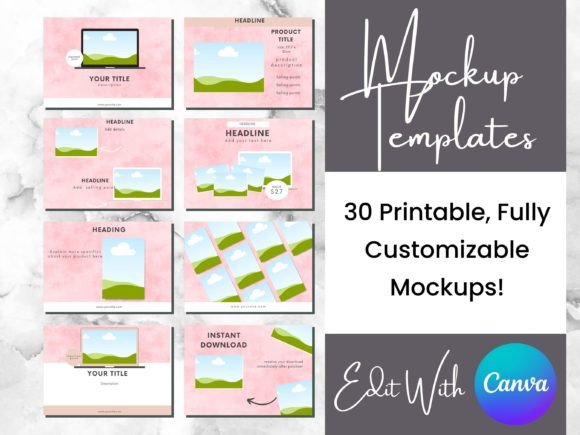
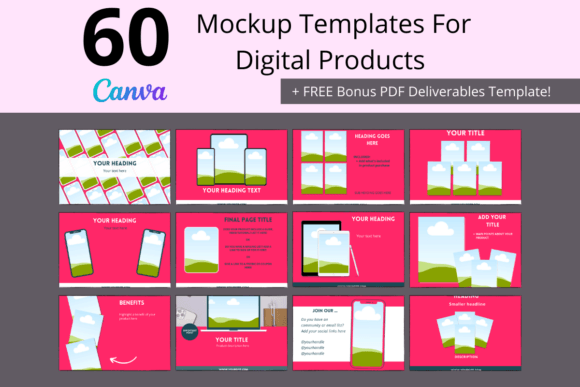
This is where a dedicated set of templates changes the game. The 60 Digital Product Mockup Templates Set is a comprehensive collection designed specifically for creators who need a faster, more reliable way to build their shop's visual identity. Think of it not as a static set of images, but as a flexible design system. Each template provides a structured frame—a clean, modern stage for your product. The core of the system is its straightforward functionality: you simply drag and drop your own product photos into the designated areas. This eliminates the guesswork of composition and layout, letting you focus on showcasing what you’ve made.
The visual personality of these templates is intentionally bold and modern. The default color palette features bright pinks and blues, a combination chosen for its high-energy appeal. These aren't pastel shades that fade into the background; they are saturated hues that create immediate contrast and visual pop. In a platform search result, where thumbnails are small and attention spans are shorter, this kind of eye-catching design is a practical advantage. It helps your listing stand out, not through gimmicks, but through confident color and clean structure. The overall style is contemporary and versatile, avoiding overly specific themes so it can adapt to everything from digital planners and SVG files to handmade jewelry and printables.
Practical Applications Across Your Brand
The true value of a resource like the 60 Digital Product Mockup Templates Set extends far beyond a single Etsy shop. Because the templates are built in Canva—a tool accessible with a free or pro account—they become a reusable asset in your broader brand toolkit. The consistent framework they provide is fundamental to building a recognizable brand identity. Using the same style of template across your product listings creates a cohesive look that signals professionalism and builds trust with potential customers. They begin to recognize your "look" in search results, which can improve click-through rates.
Consider these real-world applications:
- Social Media Graphics: Adapt a listing template to create an Instagram post or Facebook ad. Swap the product photo, adjust the text to include a call-to-action, and you have a consistent promotional graphic in minutes. This maintains visual harmony between your shop and your social channels.
- Digital Product Mockups: For creators selling digital goods like ebooks, templates, or printables, these frames are perfect for showing your product in a simulated context. Place your PDF design inside a tablet frame or your printable art on a styled desk scene within the template to help customers visualize the final product.
- Website Banners & Blog Features: Use a modified template as a featured image for a blog post announcing a new product line. The consistent styling will make your website feel more polished and integrated with your shop.
- Email Marketing: Create a cohesive look for a product launch newsletter by using a template as the hero image. This reinforces your brand aesthetic in yet another customer touchpoint.
Key Considerations for Effective Use
To get the most out of this mockup set, approach it with a strategic mindset. The templates are a starting point, not an end point. The instruction to "make a copy of your file before editing" is crucial professional advice. Always preserve the original master file so you can start fresh for a new product or season without degrading the design.
When customizing, think about your overall brand perception. The bright pink and blue are fantastic for standing out, but they can be fully adjusted. Use the color change tools in Canva to align the templates with your established brand palette. If your brand is more minimalist, you might mute the colors to soft grays and creams. If it’s earthy, try terracotta and sage green. The structure remains, but the personality becomes uniquely yours.
Pay close attention to visual hierarchy. The templates are designed with a clear focal point—your product image. Ensure your photo is high-resolution and well-lit. Use the text fields not just for your product title, but for a key benefit or a short, compelling description. The icons and rearrangeable elements allow you to add subtle details that enhance the story without cluttering the frame. This thoughtful customization is what separates a generic mockup from a powerful sales tool.
Finally, consider your audience. For a younger, trend-focused demographic, the bold colors might be perfect as-is. For a more sophisticated or professional audience, a customized color scheme might resonate better. The goal is to use the template's strong foundation to communicate your product's value clearly and attract the right buyer. By integrating these templates into your workflow, you’re not just saving time on individual listings—you’re investing in a consistent, professional, and scalable visual system for your entire creative business.