Unleash Your Memories: Mastering 16x20 Photo Collage Templates
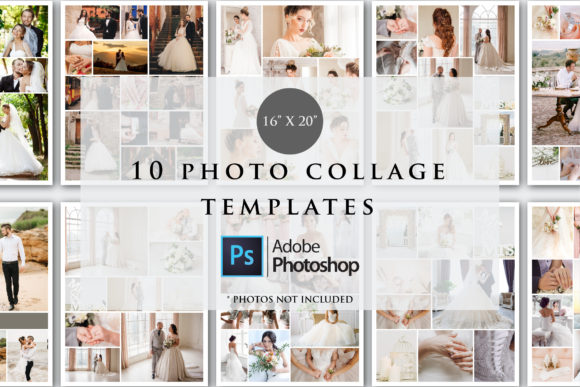
Capturing moments is one thing, but presenting them in a way that tells a cohesive, beautiful story is a different challenge entirely. If you have ever tried to manually arrange multiple images in Photoshop, you know the frustration: aligning layers, matching aspect ratios, and ensuring the final print doesn't look cluttered. This is where the 16x20 Photo Collage Templates come into play. This collection of 10 PSD files is designed to bridge the gap between raw creativity and professional polish, offering a streamlined workflow for anyone looking to create large-format visual displays.
The Anatomy of a Perfect Canvas
Before diving into the workflow, it is important to understand the specifications that make these files robust design assets. The templates are built at a standard 16 x 20 inches with a Resolution of 300 dpi and RGB Color Mode. For those unfamiliar with print specifications, this is the gold standard. The 300 DPI ensures that your images remain sharp and crisp when printed at full size, avoiding the pixelation that plagues lower-resolution files. The RGB color mode is versatile, perfect for digital display on high-end monitors, though most professional print labs will convert this to CMYK automatically during their RIP process.
Visually, these templates act as a neutral vessel. The "personality" of the final piece is dictated entirely by the photos you place inside them. However, the structure provides the visual hierarchy. Whether the layout utilizes a grid system for a modern, clean aesthetic or an overlapping arrangement for a more dynamic, editorial feel, the framework is rigid enough to maintain order but flexible enough to accommodate various brand identity needs. This is not just a digital scrapbook page; it is a tool for editorial design and packaging design layouts.
Practical Applications: From Living Room Walls to Digital Storefronts
The utility of a 16x20 Photo Collage Template extends far beyond the hobbyist printing family photos. For entrepreneurs and small business owners, this size is a cornerstone for physical branding. Imagine a coffee shop wanting to display a "Bean to Cup" journey, or a salon showcasing a portfolio of hairstyles. These templates allow you to curate a narrative that engages customers immediately upon entering the space.
For marketers and content creators, the digital application is equally powerful. While the file is set up for large print, the high resolution makes it perfect for detailed social media graphics or web design hero images. You can downscale a 16x20 collage for a Pinterest pin or an Instagram carousel without losing quality. It allows you to group product shots, customer testimonials, and lifestyle images into a single, digestible visual asset. This approach saves time and ensures visual consistency across your digital and print marketing channels.
Technical Requirements and Workflow Optimization
It is vital to address the technical environment required for these files. The product specifies that Photoshop CC is required. This is because the files utilize Smart Objects and advanced layer masking features that are native to the Adobe ecosystem. This product WILL NOT WORK without the Adobe Photoshop Software or on the mobile Photoshop app. The mobile version of Photoshop, while convenient for quick edits, lacks the processing power and feature set to handle the complexity of these layered PSD files.
Furthermore, you will need extraction software. The files are zipped so you need software to unzip the files like WinZip or WinRAR. Once extracted, the workflow is intuitive. You simply double-click the Smart Object layer, paste your image, save, and the template automatically applies the correct perspective and masking. This non-destructive editing method is a hallmark of modern typography and layout design, ensuring your original assets are never corrupted.
Elevating Visual Hierarchy and Brand Perception
How you arrange images influences how the viewer perceives the message. A chaotic collage can feel overwhelming, while a well-structured one guides the eye. These templates are built on principles of visual hierarchy. They dictate the focal point—usually the largest image slot—and support it with secondary and tertiary images. This is essential for brand identity work. If you are a designer creating a mood board for a client, using a structured template signals professionalism and attention to detail. It moves the presentation from a "collection of photos" to a "curated gallery."
For crafters and hobbyists, this structure removes the guesswork. You do not need to be a professional graphic designer to understand that a 16x20 print is a significant investment of ink and paper. By using these pre-made layouts, you mitigate the risk of printing a lopsided or poorly balanced composition. The templates provide a safety net that ensures your final product looks polished, regardless of your experience level with Adobe Photoshop.
Customization and Creative Flexibility
While the structure is fixed, the customization options are limitless. Because the files are RGB and high-resolution, they are perfect for color grading. You can apply a unified color filter across all your images to create a specific mood—warm tones for a vintage feel, or high-contrast blacks and whites for a dramatic look. This is a common technique in logo design and packaging design to ensure disparate images feel like they belong to the same set.
Additionally, these templates serve as excellent starting points for more complex design assets. You can use the collage as a background layer for text overlays, making it ideal for event invitations or sale announcements. The 16x20 aspect ratio is versatile enough to be cropped down to 8x10 or 4x5 for other uses, giving you multiple assets from a single design session.
Final Thoughts on Utility and Value
The 16x20 Photo Collage Templates are more than just empty frames; they are a workflow accelerator. They solve the common problem of layout fatigue, allowing you to focus on the content—your photos—rather than the technicalities of alignment and masking. Whether you are a blogger needing a cohesive header image, a marketer creating a product overview, or a parent preserving a milestone, these files provide the professional foundation needed to produce high-quality visual work. By adhering to industry standards of resolution and color mode, they ensure your creations are ready for the highest quality output, both on screen and in hand.