Transform Your Podcast Branding with 60 Canva Templates
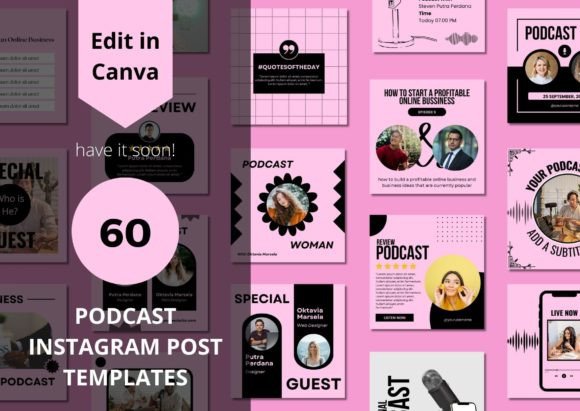
Building a recognizable podcast brand involves more than just recording great audio. The visual representation across social media platforms like Instagram often determines how quickly potential listeners stop scrolling and engage. For creators who value consistency but lack the time for daily graphic design, a structured approach is necessary. The 60 Podcast Social Media Canva Templates package is specifically engineered to solve this problem. It provides a cohesive visual language that ensures every post—from audiograms to quote graphics—feels professional and intentional. This collection acts as a foundational design asset, allowing you to maintain a high-end aesthetic without hiring a full-time designer.
The Architecture of Modern Social Media Graphics
When analyzing the visual personality of these templates, the term "modern typography" takes center stage. The layouts avoid the cluttered, overly busy designs that plagued social media graphics a few years ago. Instead, you will find clean grids, strategic use of negative space, and a focus on legibility. The style is versatile, bridging the gap between a minimalist web design aesthetic and the bold requirements of mobile-first content.
The visual hierarchy is built on a balance of sans serif font choices and accent typography. Sans serifs are the workhorses here, ensuring that subtitles, calls to action, and dates remain readable against varied background images or solid color blocks. This is crucial for social media graphics where users often skim content in under two seconds. The templates utilize weight variations—light for body text and bold for headlines—to create a natural flow that guides the viewer's eye from the hook to the engagement prompt.
Furthermore, the package includes specific layouts for product advertising and community building. For instance, the "Testimonials or reviews" templates often use subtle drop shadows or background overlays to make text pop, a technique essential for building trust. The "Giving for free" and "Quote Templates" utilize larger font sizes, transforming the text itself into a visual element. This approach to social media graphics ensures that even text-heavy posts look like curated design assets rather than generic flyers.
Practical Application: From Podcast Episodes to Brand Identity
The true value of the 60 Podcast Social Media Canva Templates lies in their adaptability across different creative workflows. If you are a content creator launching a new series, you can use the "Product Ads" templates to build anticipation. These specific layouts are designed to handle imagery of physical or digital products, allowing you to layer your own photos over the pre-designed frames. This versatility extends to packaging design previews; if you sell merchandise, you can mock up your physical goods within these frames to create a cohesive brand identity that links your podcast to your store.
For entrepreneurs and small business owners, the "Gallery" and "Thank you cards" templates serve a dual purpose. They function as editorial design pieces that break up the monotony of sales-driven content. A "Thank you" post using a script font or handwritten font accent softens the corporate edge of a business account, adding a human touch that resonates with audiences aged 20 to 50. This mix of professional layout and personal typography is a hallmark of effective modern typography.
Consider the workflow of a designer or marketer managing multiple accounts. Instead of building a layout from scratch for every episode, you start with a template. You might select a template featuring a serif font for a more traditional, authoritative look for a history podcast, or stick to a geometric sans serif for a tech review show. The ability to modify the entire template in Canva means you are not locked into a specific typeface. You can swap the default fonts for your specific brand identity guidelines, ensuring that the templates serve your existing logo design and color palette rather than the other way around.
Strategic Editing and Typography Pairing
Receiving a PDF with direct links is the starting point, not the finish line. To maximize the impact of these 60 Podcast Social Media Canva Templates, you need to approach the editing process with a strategy. The templates are designed to be fully editable, which means you have the freedom to experiment with font pairing.
A common mistake in DIY design is mixing too many font styles. Since the templates provide a baseline structure, I recommend sticking to a two-font rule: one for display and one for utility. If you decide to change the sans serif font included in the template, choose a premium font that offers multiple weights. This allows you to create hierarchy—using bold for the episode title and light for the description—without introducing visual chaos. If you want to add flair, swap the accent text with a creative font, but ensure it remains legible on mobile screens.
Readability considerations are paramount for social media graphics. When using the "Quote Templates," ensure your text color contrasts sufficiently with the background image. The templates often include semi-transparent overlays or solid shapes behind the text to facilitate this. Do not remove these functional elements; they are there to ensure your message is accessible. Whether you are using a display font for impact or a standard typeface for clarity, the background separation is what makes the design professional.
Finally, think about the longevity of your assets. These templates are not just for the immediate launch of a podcast episode. They can be repurposed for editorial design on blogs, incorporated into email headers, or used as part of a larger web design system. By treating these Canva files as a library of design assets rather than one-off images, you create a sustainable content pipeline. This approach saves time, reinforces your brand identity with every post, and ensures that your visual content matches the quality of your audio production.