Fast, Realistic Tag Design Without the Mess
Let's be honest: sometimes, you just want things to be easy. You need a batch of distressed, textured tags for a project—maybe for a scrapbook layout, a product hang-tag mockup, or a set of social media graphics—and the thought of manually painting, erasing, and blending digital brushes for every single one feels like a chore. That's exactly why the Tag Templates & Smudged-Edges Overlay exists. It was born from a designer's need for speed and consistency, a practical solution that delivers beautiful, tactile results without the fiddly, time-consuming work. If you've ever struggled to achieve that authentic, ink-on-fingers aesthetic digitally, this is your shortcut.
What Exactly Is This Design Asset?
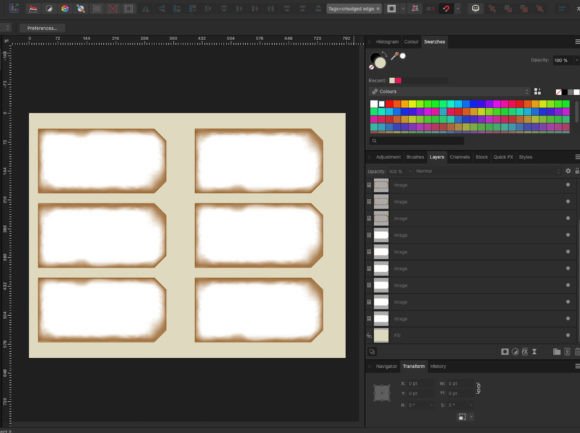
Think of the Tag Templates & Smudged-Edges Overlay as a specialized kit for creating professional-looking tags in minutes. At its core, it’s a high-resolution PDF file designed to be opened in photo editing software like Affinity Photo, Adobe Photoshop, or similar programs. It contains two key elements: a set of crisp, clean tag shapes and a collection of smudged, distressed edge overlays.
The process is brilliantly straightforward. You use the provided tag images as masks. Simply place any image or pattern—whether it's a PNG, JPG, or even a textured paper fill—over the tag shape, and the software will clip it to that form. Then, you slide one of the smudged-edge overlays over the top. The overlay interacts with the tag beneath it, creating that coveted, weathered, and slightly imperfect edge that looks like it was achieved with real ink or paint. You can then export your finished tag. Repeat the process to create a full sheet of matching tags for printing or digital use.
The Appeal of Effortless Texture
What makes this resource so valuable isn't just its speed, but its authentic visual character. The smudged edges aren't just generic grunge textures; they have a specific, organic personality. They mimic the look of ink that has bled slightly on paper, with soft, irregular lines that feel handcrafted. This style taps into a broader trend in modern typography and graphic design that values human touch and imperfection. In a world of perfectly crisp digital lines, these overlays add warmth, depth, and a sense of history to your work.
This aesthetic is incredibly versatile. It’s perfect for brand identity projects that want to convey authenticity, artisanal quality, or a vintage vibe. Imagine using these tags for a boutique coffee brand's packaging, a handmade soap company's labels, or a musician's merchandise. The distressed edges can make a logo design feel more established and trustworthy. For editorial design or blog layouts, they can add visual interest to pull quotes, chapter markers, or photo captions. They’re also a fantastic tool for crafters and hobbyists, elevating digital scrapbook pages or printable gift tags from simple to stunning.
Practical Applications Across Your Projects
The real power of the Tag Templates & Smudged-Edges Overlay lies in its flexibility. It’s not a single-use font or a one-note graphic. It's a foundational design asset that can be adapted to countless scenarios.
- For Branding & Marketing: Create cohesive sets of tags for product hang-tags, loyalty cards, or promotional stickers. The consistent distressed style ensures all your collateral feels unified, strengthening brand perception. Use them as background elements in social media graphics to frame text or highlight key messages.
- For Digital Design: In web design, these tags can be used as interactive elements or decorative accents in a user interface, especially for sites with a rustic, vintage, or handcrafted theme. They’re excellent for creating mockups that look realistic and polished.
- For Print & Publishing: Designers can use them to quickly generate editorial design elements like margin notes, sidebar highlights, or decorative bullets in magazines or books. For self-publishers, they offer a fast way to create chapter headers or page accents that feel custom-made.
- For Personal & Commercial Projects: From printable party decorations and wedding stationery to custom stickers for planners, the application is endless. The commercial licensing typically allows you to use the final tags in products you sell, making it a valuable tool for entrepreneurs and small business owners on platforms like Etsy.
Getting the Most From Your Tags
While the process is simple, a few pro tips can help you maximize the potential of this resource. First, don't overlook the power of blend modes. Applying a blend mode like Multiply, Overlay, or Soft Light to the smudged-edge layer can dramatically alter its appearance, allowing it to integrate more seamlessly with the underlying tag image or create different levels of contrast.
Second, color is your friend. The description mentions you can change the distressed edges to any color with a click. This is a game-changer for matching your brand's color palette. Instead of settling for black or grey ink, you can make the smudges a deep burgundy, a forest green, or a warm sepia tone, ensuring perfect harmony with your other design assets.
Finally, remember scalability. You can resize the tags to fit your project, but as noted, you must resize the overlay to match. A good practice is to group the tag and its overlay layer together before scaling. This maintains the relationship between the clean shape and its textured edge, preserving the realistic effect at any size. Whether you need a tiny icon or a large poster element, the quality holds up.
In the end, the Tag Templates & Smudged-Edges Overlay is about empowering your creativity. It removes a technical barrier, letting you focus on the design concept itself. It’s a tool for the busy marketer, the detail-oriented publisher, and the inspired crafter alike. By providing a fast, reliable way to achieve a popular and appealing style, it lets you produce professional, textured work efficiently—no inky fingers required.